RaspberryPi 5, Debian 13 (trixie), as DLNA renderer with output to a Teufel Cinebar One+ via USB, configured with Ansible
Table of Contents
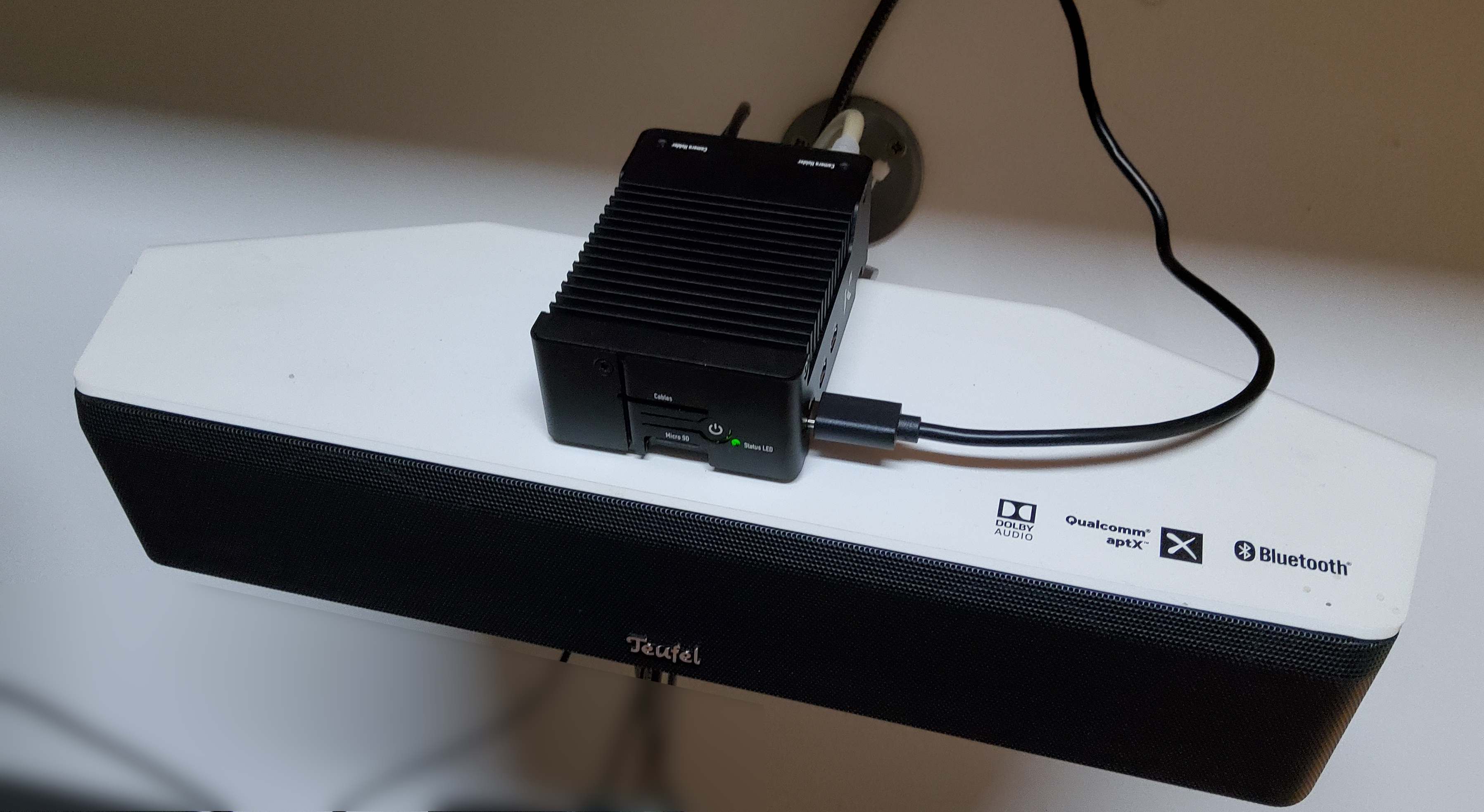
This is pretty much the same as my previous, Debian 12, post on this topic but with Debian 13 this time around.
Diff to the Bookworm Version of My Ansible Playbook
If you just want to know what changed, then this section is for you. If OTOH this is your first read of using a Raspi as DLNA renderer, then skip to the next section instead of expanding this one.
For those that know the older post, here's a diff of the playbook. (Click to expand)
pcfe@t3600 sdhl-code (devel) $ git diff
diff --git a/type__entertainment_raspi_dlna__prepare.yml b/type__entertainment_raspi_dlna__prepare.yml
index 3a31bf3..0965c8a 100644
--- a/type__entertainment_raspi_dlna__prepare.yml
+++ b/type__entertainment_raspi_dlna__prepare.yml
@@ -1,7 +1,7 @@
 # code: language=ansible
 ####################################################################################
 #  author: Patrick C. F. Ernzer <pcfe@pcfe.net>
-#  description: Prepares the RasPi 5 (running RaspberryPi OS Lite (Debian 12) connected to the Teufel Cinebar One+ for DLNA sink usage
+#  description: Prepares the RasPi 5 (running RaspberryPi OS Lite (Debian 13) connected to the Teufel Cinebar One+ for DLNA sink usage
 #  license: Creative Commons Attribution-ShareAlike 4.0 International License
 #  min_ansible_version: 2.14
 ####################################################################################
@@ -36,9 +36,9 @@
       ansible.builtin.command: newaliases
       changed_when: true

-    - name: Handle restarting cpufrequtils.service
+    - name: Handle restarting cpupower.service
       ansible.builtin.service:
-        name: cpufrequtils
+        name: cpupower
         state: restarted
       changed_when: true

@@ -73,8 +73,8 @@
     # https://github.com/hzeller/gmrender-resurrect/blob/master/INSTALL.md
     # and gmrender-resurrect is the only thing I use this RasPi for.
     # tmux and vim-solarized are not technically needed, I just like to use them
-    # cpufrequtils because I want the ability to reduce idle power consumption
-    - name: Ensure wanted packages are present if RasPi is running Debian 12 (Bookworm) or later
+    # linux-cpupower because I want the ability to reduce idle power consumption
+    - name: Ensure wanted packages are present if RasPi is running Debian 13 (Trixie) or later
       ansible.builtin.package:
         name:
           - libupnp-dev
@@ -86,11 +86,12 @@
           - gstreamer1.0-libav
           - gstreamer1.0-alsa
           - postfix
-          - cpufrequtils
+          - linux-cpupower
           - tmux
           - vim-solarized
+          - btop
         state: present
-      when: ansible_distribution == "Debian" and ansible_distribution_major_version >= "12"
+      when: ansible_distribution == "Debian" and ansible_distribution_major_version >= "13"

     # for USB audio, see all of the following links
     # https://learn.adafruit.com/usb-audio-cards-with-a-raspberry-pi/updating-alsa-config
@@ -185,7 +186,8 @@
           - gmediarender
         state: present

-    # While this is the default in the Debian 12 gmediarender package today (2024-04-07), I do want this nailed down.
+    # While this was the default in the Debian 12 gmediarender package on 2024-04-07, I do want this nailed down.
+    # and I actually forgot to check on 13 before running the playbook
     - name: Ensure gmediarender runs as nobody:audio
       ansible.builtin.lineinfile:
         path: /etc/default/gmediarender
@@ -246,8 +248,8 @@
     # FIXME: maybe add a logrotate conf file as the logs are very chatty indeed
     # not yet done because I tend to only enable logging during intial setup. Once it works I disable logging.

-    # as of 2024-04-07 I still get a SystemV init file from the Debian 12 gmediarenderer package.
-    # but since Debian 12 has wrappers to allow `systemctl […] gmediarender.service` commands to work just fine.
+    # as of 2026-05-17 I still get a SystemV init file from the Debian 13 gmediarenderer package.
+    # but since Debian 13 also has wrappers to allow `systemctl […] gmediarender.service` commands to work just fine.
     # for now just use that /etc/init.d/gmediarender even though stopping the service takes 30 secs,
     # that's fine as systemd gices it 5 mins to get its stuff sorted.
     #
@@ -260,14 +262,12 @@
         state: started

     # Currently I have no use for Bluetooth on this DLNA renderer, disable services that use it.
+    # in the past (Debian 12 and older) I also disabled hciuart. in 13 that service seems gone, goodie
     - name: Ensure Bluetooth using services I have no use for are disabled and stopped
       ansible.builtin.service:
-        name: '{{ item }}'
+        name: bluetooth
         enabled: false
         state: stopped
-      loop:
-        - hciuart
-        - bluetooth

     # disable onboard Bluetooth and WLAN
     # using a [model filter](https://www.raspberrypi.com/documentation/computers/config_txt.html#model-filters)
@@ -336,21 +336,20 @@
       notify: Handle running newaliases

     # c.f. https://www.raspberrypi.com/documentation/computers/raspberry-pi.html#using-dvfs
-    - name: Ensure cpufrequtils service is enabled and running
+    - name: Ensure cpupower service is enabled and running
       ansible.builtin.service:
-        name: cpufrequtils
+        name: cpupower
         enabled: true
         state: started

-    # on 2024-05-17 I still got an old style SysV init file with cpufrequtils, :sigh:
-    # actively setting this to fail if the file does not exist so that I can notice
-    # when cpufrequtils on Debian gets modernised to a proper systemd service
-    - name: Ensure old style /etc/init.d/cpufrequtils uses the powersave governor
+    # we want the powersave governors
+    - name: Ensure cpupower service has the powersave governor configured
       ansible.builtin.lineinfile:
-        path: /etc/init.d/cpufrequtils
-        regexp: '^GOVERNOR='
-        line: 'GOVERNOR="powersave"'
+        path: /etc/cpupower-service.conf
+        regexp: ^GOVERNOR=
+        insertafter: ^#GOVERNOR=
+        line: GOVERNOR='powersave'
         create: false
-      notify: Handle restarting cpufrequtils.service
+      notify: Handle restarting cpupower.service

 ...
pcfe@t3600 sdhl-code (devel) $
Astute readers might notice that in the pasted playbook below, my postfix tasks are not present because well sending email is not needed for music rendering and I want this post KISS.
Introduction
These are my notes on setting up:
- Debian GNU/Linux 13 (trixie) aka Raspberry Pi OS (64-bit) Lite
- on a Raspberry Pi 5
- housed in a passively cooled KKSB case
- using USB audio to output on a Teufel Cinebar One+
- playing music via DLNA with gmrender-resurrect
This w-e I re-did my DLNA renderer with Debian 13 (trixie). While I could have run dist-upgrade on my Debian 12 install, I went for a freshly writteb BaseOS SD card and ensuring my Ansible playbook works for a Debian 13 target.
The aim is to use a RasPi, a small µSD card for booting plus a USB attached sound bar to play music using DLNA.
The music files themselves are hosted on one (or more) DLNA servers.
Controlling the music happens via one (or more) DLNA controllers.
For me µSD cards are definitely consumables with a limited life, I wanted to ensure that if I ever have a dead µSD card on my hands I can redeploy on a fresh card with today’s current Debian version.
Overview
- optional: house RasPi 5 in a case
- connect Cinebar via USB to RasPi 5
- write ųSD card using rpi-imager with custom config set as needed (hostname, user, ssh key, …)
- disable HDMi audio
- optional: disable services that use Bluetooth
- optional: disable Bluetooth hardware via dtoverlay
- optional: disable WiFi hardware via dtoverlay
- optional: use powersaving CPU frequency scaling governor
- install gmrender-resurrect
- ensure gmrender-resurrect runs at boot
- use a DLAN control point for song selection, play, stop, etc
- press power button to trigger a clean shutdown
- optional: automatic clean shutdown N hours after powerup
Hardware Details
Chosen Hardware
- Raspberry Pi 5
- Raspberry Pi 15W USB-C Power Supply
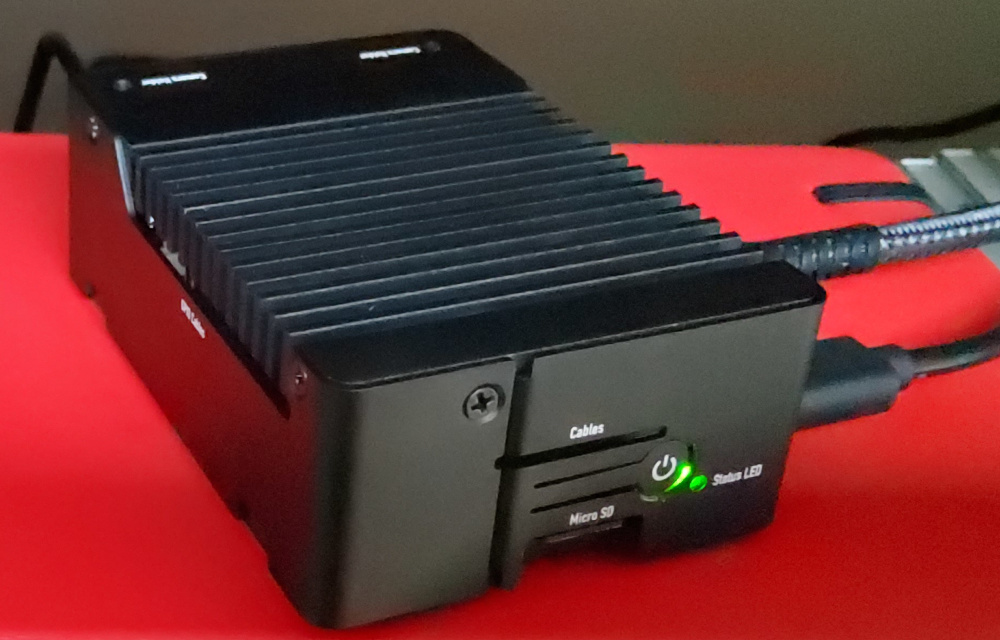
- KKSB Raspberry Pi 5 Case with Aluminium Heatsink for Silent Passive Cooling
- Teufel Cinebar One+ connected via USB
The RasPi 5 and case were purchased new. My existing 15W PSU is sufficient for my planned power draw. The Cinebar has been serving me well for a while now.
I picked a µSd card from my heap of old ones for this rollout. I put the Debian 12 installed µSD card as is in the spares collection, that gives me an easy way back to the old setup if something were to go pear shaped with my trixie based rollout.
The 27W PSU is overkill for my use case (no fan, Cinebar has own PSU).
While my RasPi 5 has 8 GiB RAM, the 4 GiB model and even only 2 GiB would be more than sufficient for this one trick pony use case.
RasPi to Cinebar Connection
I connected the Cinebar to the RasPi via USB.
The RasPi 5 no longer comes with the low quality 3.5mm audio jack previous models had (good riddance). Plus I disable audio over HDMI because I do not plan to use audio over HDMI on this RasPi and I want the HDMI input on the Cinebar available for other uses.
This leaves only usb-audio, at index 0, and I can use the shipped defaults of alsa.conf etc.
RasPi Enclosure
While I could use the naked RasPi, I wanted all of
- a heatsink
- no noisy fan
- some dust protection
I looked at the options available from the place I decided to by my RasPi5 from and chose this passively cooled KKSB case.
Software Used
gmrender-resurrect is available on Raspberry Pi OS Lite (64-bit) (Debian 13) with a simple apt install gmediarender.
Operating System Used
I did a fresh install of Raspberry Pi OS Lite (64-bit), Debian version: 13 (trixie).
Created the µSD card with the Raspberry Pi Imaging Utility (aka rpi-imager).
It is well documented.
With these selections:
- Device: RaspberryPi 5
- Operating System: RaspberryPi OS Lite (64-bit)
- set hostname
- set user and password
- set locale
- enable ssh
- allow public-key authentication only
- eject media when finished
NOTE: Lite simply because on this headless RasPi there is no point in wasting resources on running a desktop environment,
so there is no point either in having it on the µSD card. If I want a package I can easily apt install or ansible.builtin.package:.
Not being in an active desktop session has the welcome side-effect of the Pi shutting down cleanly when I press the power button without me having to acknowledge in a window [that would] appear asking whether you want to shutdown, reboot, or logout.
Once the tool had finished writing to the SD card, I plugged it into the RaspberryPi 5 and booted from it.
Once it had booted up, I upgraded using APT
sudo apt update && sudo apt full-upgrade # click to see details
pcfe@raspi5:~ $ sudo apt update
Hit:1 http://deb.debian.org/debian trixie InRelease
Hit:2 http://deb.debian.org/debian trixie-updates InRelease
Hit:3 http://deb.debian.org/debian-security trixie-security InRelease
Hit:4 http://archive.raspberrypi.com/debian trixie InRelease
79 packages can be upgraded. Run 'apt list --upgradable' to see them.
pcfe@raspi5:~ $
pcfe@raspi5:~ $ sudo apt full-upgrade
The following packages were automatically installed and are no longer required:
  libdrm-amdgpu1  libglvnd0           libwayland-server0  libxcb-shm0     mesa-libgallium
  libegl-mesa0    libllvm19           libx11-xcb1         libxcb-sync1
  libegl1         libsensors-config   libxcb-dri3-0       libxcb-xfixes0
  libgbm1         libsensors5         libxcb-present0     libxshmfence1
  libgles2        libwayland-client0  libxcb-randr0       libz3-4
Use 'sudo apt autoremove' to remove them.

Upgrading:
  7zip                  libcamera0.7              libpython3.13-minimal   openssl
  base-files            libcap2                   libpython3.13-stdlib    openssl-provider-legacy
  bash                  libcap2-bin               libqt6core6t64          python3-jwt
  busybox               libcom-err2               librpicam-app1          python3.13
  curl                  libcurl3t64-gnutls        libss2                  python3.13-minimal
  dirmngr               libcurl4t64               libssl3t64              python3.13-venv
  distro-info-data      libexif12                 libsystemd-shared       raspi-firmware
  dnsmasq-base          libext2fs2t64             libsystemd0             rpi-eeprom
  e2fsprogs             libglib2.0-0t64           libudev1                rpicam-apps-core
  gnupg-utils           libglib2.0-data           linux-headers-rpi-2712  rpicam-apps-lite
  gpg                   libgnutls30t64            linux-headers-rpi-v8    rsync
  gpg-agent             libnghttp2-14             linux-image-rpi-2712    sed
  gpg-wks-client        libngtcp2-16              linux-image-rpi-v8      ssh
  gpgconf               libngtcp2-crypto-gnutls8  linux-libc-dev          sudo
  gpgsm                 libntfs-3g89t64           logsave                 systemd
  gpgv                  libpam-systemd            nano                    systemd-sysv
  initramfs-tools       libpisp-common            ntfs-3g                 systemd-timesyncd
  initramfs-tools-bin   libpisp1                  openssh-client          tzdata
  initramfs-tools-core  libpng16-16t64            openssh-server          udev
  libcamera-ipa         libpython3.13             openssh-sftp-server

Installing dependencies:
  cpp-14-for-host                  linux-headers-6.18.29+rpt-common-rpi
  gcc-14-for-host                  linux-headers-6.18.29+rpt-rpi-2712
  linux-base-6.18.29+rpt-rpi-2712  linux-headers-6.18.29+rpt-rpi-v8
  linux-base-6.18.29+rpt-rpi-v8    linux-image-6.18.29+rpt-rpi-2712
  linux-base-rpi-2712              linux-image-6.18.29+rpt-rpi-v8
  linux-base-rpi-v8                linux-kbuild-6.18.29+rpt

Suggested packages:
  debian-kernel-handbook  firmware-linux-free  linux-doc-6.18

Summary:
  Upgrading: 79, Installing: 12, Removing: 0, Not Upgrading: 0
  Download size: 147 MB
  Space needed: 180 MB / 10.0 GB available

Continue? [Y/n]
[…]
pcfe@raspi5:~ $ sudo reboot
pcfe@raspi5:~ $ Read from remote host raspi5.internal.pcfe.net: Connection reset by peer
Connection to raspi5.internal.pcfe.net closed.
client_loop: send disconnect: Broken pipe
Wait a bit for it to finish booting, and log in again.
user@workstation ~ $ ssh raspi5.internal.pcfe.net
Linux raspi5 6.18.29+rpt-rpi-2712 #1 SMP PREEMPT Debian 1:6.18.29-1+rpt1 (2026-05-12) aarch64

The programs included with the Debian GNU/Linux system are free software;
the exact distribution terms for each program are described in the
individual files in /usr/share/doc/*/copyright.

Debian GNU/Linux comes with ABSOLUTELY NO WARRANTY, to the extent
permitted by applicable law.
Last login: Sun May 17 11:44:07 2026 from 192.168.50.59
pcfe@raspi5:~ $ uname -r
6.18.29+rpt-rpi-2712
pcfe@raspi5:~ $ cat /etc/os-release
PRETTY_NAME="Debian GNU/Linux 13 (trixie)"
NAME="Debian GNU/Linux"
VERSION_ID="13"
VERSION="13 (trixie)"
VERSION_CODENAME=trixie
DEBIAN_VERSION_FULL=13.5
ID=debian
HOME_URL="https://www.debian.org/"
SUPPORT_URL="https://www.debian.org/support"
BUG_REPORT_URL="https://bugs.debian.org/"
pcfe@raspi5:~ $
And I ensured I was running the latest firmware with
sudo rpi-update # click to see details
pcfe@raspi5:~ $ sudo rpi-update
 *** Raspberry Pi firmware updater by Hexxeh, enhanced by AndrewS and Dom
 *** Performing self-update
 *** Relaunching after update
 *** Raspberry Pi firmware updater by Hexxeh, enhanced by AndrewS and Dom
FW_REV:43e56e800b6c814e6bd78a7ee04dda903f2986b4
BOOTLOADER_REV:9f2bda193bb43b8049b0e9f24492fceae28c9b03
 *** We're running for the first time
 *** Backing up files (this will take a few minutes)
 *** Backing up firmware
 *** Backing up modules 6.18.29+rpt-rpi-2712
WANT_32BIT:0 WANT_64BIT:1 WANT_64BIT_RT:0 WANT_PI4:1 WANT_PI5:1

Updating a system with initramfs configured is not supported by rpi-update.
If your system relies on drivers provided by the initramfs (e.g. custom filesystem options)
it may not boot without regenerating the initramfs.
If you are unsure, test if your system boots with initramfs options disabled from config.txt

Would you like to proceed? (y/N)
##############################################################
WARNING: This update bumps to rpi-6.18.y linux tree
This update will install from the 'next' firmware branch.
See discussions at:
https://forums.raspberrypi.com/viewtopic.php?t=394580
##############################################################
Would you like to proceed? (y/N)
Downloading bootloader tools
Downloading bootloader images
 *** Downloading specific firmware revision (this will take a few minutes)
  % Total    % Received % Xferd  Average Speed   Time    Time     Time  Current
                                 Dload  Upload   Total   Spent    Left  Speed
  0     0    0     0    0     0      0      0 --:--:-- --:--:-- --:--:--     0
100  166M  100  166M    0     0  25.6M      0  0:00:06  0:00:06 --:--:-- 26.5M
*** PREPARING EEPROM UPDATES ***

BOOTLOADER: update available
   CURRENT: Fri  6 Feb 14:31:40 UTC 2026 (1770388300)
    LATEST: Wed 13 May 11:27:11 UTC 2026 (1778671631)
   RELEASE: latest (/usr/lib/firmware/raspberrypi/bootloader-2712/latest)
            Use raspi-config to change the release.
   CURRENT: Fri  6 Feb 14:31:40 UTC 2026 (1770388300)
    UPDATE: Wed 13 May 11:27:11 UTC 2026 (1778671631)
    BOOTFS: /boot/firmware
'/tmp/tmp.4gWBcFmQvf' -> '/boot/firmware/pieeprom.upd'

UPDATING bootloader. This could take up to a minute. Please wait

*** Do not disconnect the power until the update is complete ***

If a problem occurs then the Raspberry Pi Imager may be used to create
a bootloader rescue SD card image which restores the default bootloader image.

flashrom -p linux_spi:dev=/dev/spidev10.0,spispeed=16000 -w /boot/firmware/pieeprom.upd
Verifying update
VERIFY: SUCCESS
UPDATE SUCCESSFUL
 *** Updating firmware
 *** Updating kernel modules
 *** depmod 6.18.29-v8-16k+
 *** depmod 6.18.29-v8+
 *** depmod 6.18.29-v8-rt+
 *** Updating VideoCore libraries
 *** Running ldconfig
 *** Storing current firmware revision
 *** Deleting downloaded files
 *** Syncing changes to disk
 *** If no errors appeared, your firmware was successfully updated to 43e56e800b6c814e6bd78a7ee04dda903f2986b4
 *** A reboot is needed to activate the new firmware
pcfe@raspi5:~ $ sudo reboot
Configured Using Ansible
Back in 2021, I had cobbled together what I learned from
- Playing music on a Raspberry Pi using UPnP and DLNA (v3).
- Raspbian Bullseye - Updating alsa options
- How can I use an external USB sound-card and set it as default?
- Banana Pi as UPnP music player (gstreamer1.0-alsa needs installing)
into an Ansible playbook. In 2024 I polished that Playbook a bit further. You will find the latest version further down below in this 2026 post.
Follow the above links if you are not comfortable with Ansible, it shows you how do the setup via bash. The reason I use Ansible for my setup is because a RasPi, especially the µSD card is cattle, not pets to me. So if something breaks, I want to be able to plonk a new one in, run a playbook that configures Raspbian and listen again to music in the home office room.
Inventory Entries
A couple inventory entries are needed for this playbook. Adjust to your username and RasPi hostname.
- My
…/ansible-inventory-housenet/hostsis in INI format and has a line
raspi5.internal.pcfe.net
- Since this version of Raspberry Pi OS was installed without creating a user
pi, but with creating a userpcfe. This user, created via OS Customization in rpi-imager, can sudo without password. My…/ansible-inventory-housenet/host_vars/raspi5.internal.pcfe.net/ansible_user.ymlreads;
---
ansible_user: pcfe
- My
…/ansible-inventory-housenet/host_vars/raspi5.internal.pcfe.net/gmediarenderer.ymlreads;
---
gmediarender_logging: false
If I feel the need to debug, then I set gmediarender_logging: true and read /var/log/gmediarender/gmediarender.log.
Because the log is chatty, once a problem is resolved, I set the boolean back to false and re-run the play
to both disable logging and delete the log directory.
Template for Poweroff Timer, Systemd
My templates/timers/shutdown_12_hours_after_boot.timer.j2 reads;
[Unit]
Description=Poweroff 12 hours after boot

[Timer]
OnBootSec=12hours
Unit=systemd-poweroff.service

[Install]
WantedBy=timers.target
This powers down unconditionally 12 hours after powerup, adjust the number of OnBootSec=… to your needs.
The Ansible Playbook
Is nearly the same as what I used for Debain 12 in the past, changes for Debian 13 (trixie) were
- added
btopto the installed packages, because I like it and use it on other hosts - package cpufrequtils became package cpupower
- hciuart.service was no longer present in my Debian 13 install, so I no longer disable that service
This is, once again, an adjusted version of my earlier playbook,
The Playbook, called type__entertainment_raspi_dlna__prepare.yml, is meant to be self explanatory.
Hence the many comment lines and the long task names. Both are intentional.
code as docs and all that jazz.
Read it, adjust to your needs. Name it any name you want, I chose this rather long name because it is in a repository containing many other ansible plays.
For the steps marked optional: in the tl;dr section; what would need doing in a shell is hopefully obvious
after reading both my playbook and the other sources
(e,g, Edit some file and change foo to bar in bash is ansible.builtin.lineinfile: with regexp: foo and line: bar in ansible.
Add a section [pi5] with these two lines … and before the section [all] in bash is ansible.builtin.blockinfile: with insertbefore: ^\[all\] in ansible.
After you edited the file, reboot with sudo shutdown -r now in bash is notify: Handle rebooting and ansible.builtin.reboot: in ansible. You get the idea)
# code: language=ansible
####################################################################################
#  author: Patrick C. F. Ernzer <pcfe@pcfe.net>
#  description: Prepares the RasPi 5 (running RaspberryPi OS Lite (Debian 13) connected to the Teufel Cinebar One+ for DLNA sink usage
#  license: Creative Commons Attribution-ShareAlike 4.0 International License
#  min_ansible_version: 2.14
####################################################################################

# used hardware:
# - Teufel Cinebar One+
#   https://teufel.de/cinebar-one-105396000
# - Raspberry Pi 5
#   https://www.raspberrypi.com/products/raspberry-pi-5/
# - KKSB Raspberry Pi 5 Case with Aluminium Heatsink for Silent Passive Cooling
#   https://kksb-cases.com/products/kksb-raspberry-pi-5-case-with-aluminium-heatsink-for-silent-passive-cooling
#   assembly instructiopns for the case are at https://kksb-cases.com/pages/assembly-instruction-kksb-raspberry-pi-5-case-passive-heat-sink

---

- name: Ensure the Raspberry Pi is ready for DLNA renderer duties
  hosts: raspi5.internal.pcfe.net
  become: true

  # variables should be set in inventory
  # just fiddle here when debugging
  # vars:
  #   gmediarender_logging: true
  #   gstout_buffer_duration: 0  $ that one is actually not anywhere in use at the moment

  handlers:
    - name: Handle running newaliases
      ansible.builtin.command: newaliases
      changed_when: true

    - name: Handle restarting cpupower.service
      ansible.builtin.service:
        name: cpupower
        state: restarted
      changed_when: true

    # note that the service takes some 30 seconds to shutdown or restart
    - name: Handle restarting gmediarenderer
      ansible.builtin.service:
        name: gmediarender
        state: restarted
      changed_when: true

    - name: Handle systemd daemon reload
      ansible.builtin.systemd:
        daemon_reload: true

    - name: Handle rebooting
      ansible.builtin.reboot:

  tasks:
    # enable persistent journal
    # no owner, group or mode because systemd sets these the way it needs at boot time anyway
    - name: Ensure persistent logging for the systemd journal is possible
      ansible.builtin.file:  # noqa risky-file-permissions
        path: /var/log/journal
        state: directory

    # ensure the needed packages are installed
    # I use ALSA simply because the author of gmediarender-resurrect uses ALSA
    # https://github.com/hzeller/gmrender-resurrect/blob/master/INSTALL.md
    # and gmrender-resurrect is the only thing I use this RasPi for.
    # tmux, vim-solarized and btop are not technically needed, I just like to use them
    # linux-cpupower because I want the ability to reduce idle power consumption
    - name: Ensure wanted packages are present if RasPi is running Debian 13 (trixie) or later
      ansible.builtin.package:
        name:
          - libupnp-dev
          - libgstreamer1.0-dev
          - gstreamer1.0-plugins-base
          - gstreamer1.0-plugins-good
          - gstreamer1.0-plugins-bad
          - gstreamer1.0-plugins-ugly
          - gstreamer1.0-libav
          - gstreamer1.0-alsa
          - linux-cpupower
          - tmux
          - vim-solarized
          - btop
        state: present
      when: ansible_distribution == "Debian" and ansible_distribution_major_version >= "13"

    - name: Ensure HDMI audio is disabled
      ansible.builtin.lineinfile:
        group: root
        mode: u=rwx,g=rx,o=rx
        owner: root
        path: /boot/firmware/config.txt
        regexp: '^dtoverlay=vc4-kms-v3d'
        line: 'dtoverlay=vc4-kms-v3d,noaudio'

    # Now do the renaining  steps from <http://blog.scphillips.com/posts/2014/05/playing-music-on-a-raspberry-pi-using-upnp-and-dlna-v3/>
    - name: Ensure all updates are applied
      ansible.builtin.package:
        update_cache: true
        name: '*'
        state: latest  # noqa package-latest
      tags: apply_errata

    - name: Ensure gmrender-resurrect is present, package name is gmediarender
      ansible.builtin.package:
        name:
          - gmediarender
        state: present

    # While this was the default in the Debian 12 gmediarender package on 2024-04-07, I do want this nailed down.
    # and I actually forgot to check on 13 before running the playbook
    - name: Ensure gmediarender runs as nobody:audio
      ansible.builtin.lineinfile:
        path: /etc/default/gmediarender
        regexp: '^DAEMON_USER='
        insertafter: '^# User and group the daemon will be running as.'
        line: 'DAEMON_USER="nobody:audio"'
      notify: Handle restarting gmediarenderer

    - name: Ensure gmediarender has no ALSA_DEVICE set, it should use the gstreamer default
      ansible.builtin.lineinfile:
        path: /etc/default/gmediarender
        regexp: '^ALSA_DEVICE'
        state: absent
      notify: Handle restarting gmediarenderer

    # I find the default volume too high for comfort, so lower it
    - name: Ensure gmediarender has a more reasonable start volume of 40/100 than the default 75/100
      ansible.builtin.lineinfile:
        path: /etc/default/gmediarender
        regexp: '^INITIAL_VOLUME_DB='
        line: 'INITIAL_VOLUME_DB=-28'
      notify: Handle restarting gmediarenderer

    # For logging on/off, use the variable gmediarender_logging (bool)
    - name: If logging is enabled, then ensure directory /var/log/gmediarender exists
      ansible.builtin.file:
        path: /var/log/gmediarender
        state: directory
        owner: root
        group: audio
        mode: u=rwx,g=rwx,o=rx
      when: gmediarender_logging

    - name: Ensure gmediarender DOES have logging enabled
      ansible.builtin.lineinfile:
        path: /etc/default/gmediarender
        regexp: '^DAEMON_EXTRA_ARGS='
        insertafter: '^# DAEMON_EXTRA_ARGS='
        line: 'DAEMON_EXTRA_ARGS="--logfile /var/log/gmediarender/gmediarender.log"'
      notify: Handle restarting gmediarenderer
      when: gmediarender_logging

    - name: If logging is disabled, then ensure /var/log/gmediarender does not exists
      ansible.builtin.file:
        path: /var/log/gmediarender
        state: absent
      when: not gmediarender_logging

    - name: Ensure gmediarender does NOT have logging enabled
      ansible.builtin.lineinfile:
        path: /etc/default/gmediarender
        regexp: '^DAEMON_EXTRA_ARGS='
        insertafter: '^# DAEMON_EXTRA_ARGS='
        line: 'DAEMON_EXTRA_ARGS=""'
      notify: Handle restarting gmediarenderer
      when: not gmediarender_logging

    # as of 2026-05-17 I still get a SystemV init file from the Debian 13 gmediarenderer package.
    # but since Debian 13 also has wrappers to allow `systemctl […] gmediarender.service` commands to work just fine.
    # for now just use that /etc/init.d/gmediarender even though stopping the service takes 30 secs,
    # that's fine as systemd gices it 5 mins to get its stuff sorted.
    #
    # FIXME, potentially, continue playing with gstout_buffer_duration and/or a systemd unit file
    # there's already a template in this repo
    - name: Ensure gmediarender service is enabled and started
      ansible.builtin.service:
        name: gmediarender
        enabled: true
        state: started

    # Currently I have no use for Bluetooth on this DLNA renderer, disable services that use it.
    # in the past (Debian 12 and older) I also disabled hciuart. in 13 that service seems gone, goodie
    - name: Ensure Bluetooth using service I have no use for are disabled and stopped
      ansible.builtin.service:
        name: bluetooth
        enabled: false
        state: stopped

    # disable onboard Bluetooth and WLAN
    # using a [model filter](https://www.raspberrypi.com/documentation/computers/config_txt.html#model-filters)
    # frack, with community.general.ini_file I get the [rp5] section after the [all] section
    # so using ansible.builtin.blockinfile instead
    - name: Ensure WiFi and Bluetooth are disabled on RasPi 5
      ansible.builtin.blockinfile:
        dest: /boot/firmware/config.txt
        block: |
          [pi5]
          dtoverlay=disable-bt-pi5
          dtoverlay=disable-wifi-pi5
        marker: "# {mark} Ansible Managed Block to disable BT and WiFi on RasPi5"
        insertbefore: ^\[all\]
        owner: root
        group: root
        mode: u=rwx,g=rx,o=rx
        # append_newline: true  # this needs version 2.16 or later of ansible-core
      notify: Handle rebooting

    - name: Check to see if we need a reboot, Debian style
      ansible.builtin.stat:
        path: /var/run/reboot-required
      register: reboot_required_file
      when: ansible_pkg_mgr == "apt"

    - name: Notify the handler for rebooting, if Debian style hint file is present
      ansible.builtin.debug:
        msg: Found reboot hint file
      when:
        - reboot_required_file is defined
        - reboot_required_file.stat.exists is defined
        - reboot_required_file.stat.exists
      changed_when: reboot_required_file.stat.exists
      notify: Handle rebooting

    # When I forget to shut down the RasPi manually, it should power itself down 12 hours after bootup.
    - name: Ensure systemd-poweroff.timer for systemd is present
      ansible.builtin.template:
        src: timers/shutdown_12_hours_after_boot.timer.j2
        dest: /etc/systemd/system/systemd-poweroff.timer
        owner: root
        group: root
        mode: u=rw,g=r,o=r
      notify: Handle systemd daemon reload

    - name: Ensure timer to power off after 12 hours is both started and enabled
      ansible.builtin.systemd:
        name: systemd-poweroff.timer
        state: started
        enabled: true

    # c.f. https://www.raspberrypi.com/documentation/computers/raspberry-pi.html#using-dvfs
    - name: Ensure cpupower service is enabled and running
      ansible.builtin.service:
        name: cpupower
        enabled: true
        state: started

    # we want the powersave governors
    - name: Ensure cpupower service has the powersave governor configured
      ansible.builtin.lineinfile:
        path: /etc/cpupower-service.conf
        regexp: ^GOVERNOR=
        insertafter: ^#GOVERNOR=
        line: GOVERNOR='powersave'
        create: false
      notify: Handle restarting cpupower.service
...
How to Run the Playbook
Option 1: with ansible-navigator
ansible-navigator run type__entertainment_raspi_dlna__prepare.yml
When having the relevant ssh private key loaded into the ssh-agent(1) of the session you run navighator from,
then navigator will use that key to authenticate as ansible_user: …
when connecting to the RasPi.
Please note, I have an ansible-navigator.yml pointing to the used inventory and setting a few other options I like to use.
Click to see my Ansible Navigator configuration file.
ansible-navigator.yml in the directory I run the the playbook from.
Do not copy blindly, edit to your needs, especially location of inventory.
And maybe also the location of log files, making the host’s CA trust available to the execution environment, set how navigator will open a file when you type :o, etc.
I use AAP 2.4’s ee-minimal-rhel8 in this config file.
You can use any Execution Environment (EE) Image you want
(for example ghcr.io/ansible/creator-ee).
options: O in volume-mounts: alows the EE both to have your hosts’s ca-trust available
and allows the EE to adjust it’s ca-trust but those changes in the EE will not end up on your host.
Create the directory navigator-output and add it to your .gitignore
---
# RTFM at https://ansible.readthedocs.io/projects/navigator/settings/
ansible-navigator:
  ansible:
    inventory:
      entries:
        - ../../../HouseNet/ansible-inventory-housenet/hosts
        - ../../../HouseNet/ansible-vault-housenet/empty-hosts-file-to-make-ansible-happy.ini
ansible-runner:
    artifact-dir: navigator-output/runner/
    rotate-artifacts-count: 10
  execution-environment:
    container-engine: podman
    enabled: true
    image: registry.redhat.io/ansible-automation-platform-24/ee-minimal-rhel8
    pull:
      policy: missing
    environment-variables:
      set:
        ANSIBLE_LOG_PATH: navigator-output/ansible.log
    volume-mounts:
      - src: /etc/pki/ca-trust
        dest: /etc/pki/ca-trust
        options: O
logging:
    append: false
    file: navigator-output/ansible-navigator.log
  playbook-artifact:
    enable: true
    save-as: navigator-output/{playbook_name}-artifact-{time_stamp}.json
  editor:
    command: codium -g {filename}:{line_number}
    console: false
Also note that I actually
ANSIBLE_VAULT_PASSWORD_FILE=.vault_password.sh ansible-navigator run …
simply because I have 2 inventories configured in the git repository the playbook lives in and one of them is a collection of vaulted files (none of which is needed for this one play though).
Click to see my .vault_password.sh script.
.vault_password.sh in the directory I run the the playbook from.
#!/bin/sh
#
# See section "Store the vault password in an environment variable" at
# https://ansible.readthedocs.io/projects/navigator/faq/#how-can-i-use-a-vault-password-with-ansible-navigator
#
# put your password in an env var, but not in your bash history
# obviously not only set history control, but also remember to actually use a leading space
# after that this scriptlet will echo your password and ansible tooling (-playbook, -vault,
# -navigator, etc) is happy to use this script as vault password source
# Set the environment variable to the location of the file when executing ansible-navigator
#
# use as follows
# user@host $ HISTCONTROL=ignorespace
# user@host $  export ANSIBLE_VAULT_PASSWORD=my_password
# user@host $ ANSIBLE_VAULT_PASSWORD_FILE=.vault_password.sh ansible-navigator run site.yml
echo ${ANSIBLE_VAULT_PASSWORD}
If you are not a bash user, then adjust the exclusion of the export ANSIBLE_VAULT_PASSWORD=my_password
command from your shell’s history (zsh, fish or whichever your shell of choice is).
Option 2: with ansible-playbook
You can of course also run this old-school with ansible-playbook if you are not using ansible-navigator.
ansible-playbook \
  --inventory […some path…]/hosts \
  type__entertainment_raspi_dlna__prepare.yml
Playing Music via DLNA
Obvious if you used DLNA before, but in case this is your first use of DLNA;
- If off (LED red), boot the RasPi by shortly pressing the power button on the case, Wait a moment for the RasPi to finish booting.
- Ensure the Cinebar is on and set to Bluetooth input, wait for LED to be solid blue (USB and BT use the same input. When the Cinebar is still starting up, the LED pulses).
- Open your preferred DLNA control point on a device of your choice (on Android I use BubbleUPnP).
- select a media library of your choice (I use ReadyMedia (aka minidlna) on a Linux server).
- select your RasPi as renderer, by default it is called gmediarender on $(hostname).
- via your DLNA control point, you manage
- choice of song
- playlist (n.b. the playlist resides on your control point, not the renderer)
- volume
- play, pause, seek, stop, next/previous track
Be patient when waiting for DLNA devices to appear, if your setup is suboptimal, wait easily 10 minutes or more for your music server to appear.
Usage Notes
Ideally you would shut down both the RasPi and the Cinebar when not in use, to save some energy.
The RasPi 5 comes with a power buton, no additional software or setup needed. Press it briefly to initiate shutdown.
Because I chose Raspberry Pi OS (64-bit) Lite, I have no desktop session, which means a clean shutdown is triggered, without additional dialogs to click OK in, by briefly pressing the power button. Exactly the behaviour I want.
To force a hard shutdown, press and hold the power button.
Avoid doing that, prefer the clean shutown.
The Cinebar will enter low power mode (LED is red) by itself if no audio is played for a while.
If, like me, you frequently forget to power down the RasPi, then consider setting up an automatic shutdown timer as shown in the playbook.
Why Did I Again Start from Scratch
While my setup with RasPi 5 and Debian 12 (bookworm) worked well, Debian 12 will become EOL about a month form today and this DLNA setup of mine has always been cattle, not pets for me.
Reason for New OS Install
Normally, on Debian, I upgrade from one stable release to the next, but the Raspberry Pi OS docs say
Upgrading an existing image is sometimes possible, but is not guaranteed to work in every circumstance, and we do not recommend it.
Never touch a running system is a dumb idea, security updates need applying and when an operating system version is at End of Life, then it’s time to pick a newer base OS version.
Reasons for Playbook Changes
This was really just a cleanup job of the playbook I used for my Debian 12 based setup, this time around all that really needed dealing with was the packaging change from cpufrequtils to cpupower.
TODO
- revisit post when this has been in active use for a few weeks